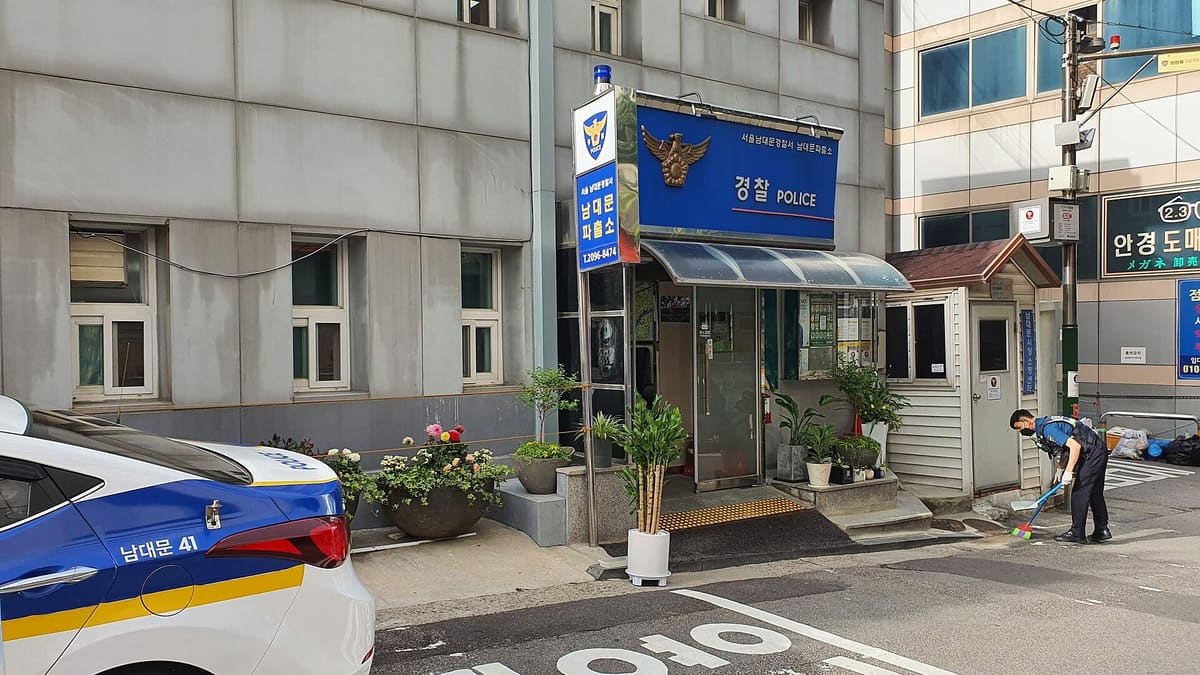
Skip to main content← All guidesNamdaemun Police Box in Seoul. For an immediate threat call 112; a police box can help with non-medical lost-property reports.Photo: Twotwo2019 · CC BY-SA 4.0 · resized
SAFETY · GUIDE
Lost property, phones and passports in Korea
Retrace the exact place and operator first, search Police Lost112, make a police report when needed, and contact your embassy immediately when a passport is missing.
Realising an important item is missing→Recovery or an official report and replacement path
QUICK ANSWER
Get the answer before the details.
◆
National portal
Police Lost112
●
Police help
182 or a police station
+
Passport
Embassy or consulate
LAST CHECKEDAugust 22, 2026
USE IT ON THE TRIP
Keep this guide for the day you need it.
Add it to an itinerary, or ask travelers when one detail may have changed since the last official check.
1Protect accounts and immediate safetyIf a phone or wallet is missing, use the device or bank's official controls to lock it and protect payment access.
If a phone or wallet is missing, use the device or bank's official controls to lock it and protect payment access. Call 112 if theft is happening now or you are in danger.
2Rebuild the last confirmed locationWrite the Korean place name, date, time window, route, station exit, vehicle plate or receipt, item description and unique marks before memory fades.
Write the Korean place name, date, time window, route, station exit, vehicle plate or receipt, item description and unique marks before memory fades.
Act now
3Contact the operator before the trail goes coldAsk the taxi app, railway, bus, airport, hotel, restaurant or venue lost-and-found desk using the trip or payment record.
Ask the taxi app, railway, bus, airport, hotel, restaurant or venue lost-and-found desk using the trip or payment record. Keep the case number.
4Search Police Lost112Search the official found-property records using broad and narrow Korean categories, dates and areas.
분실물 · 유실물 · 습득물 · 경찰서 · 지구대
A schematic of labels to look for, not a photograph of actual facility signage.
Search the official found-property records using broad and narrow Korean categories, dates and areas. A found item may remain with the original institution before transfer.
Look for 분실물 · 유실물 · 습득물 · 경찰서 · 지구대
Follow up
5Make an official report when neededTravelers who cannot use the online identity process can visit a police station or police box.
Travelers who cannot use the online identity process can visit a police station or police box. Ask for the loss-report receipt when needed for insurance or replacement.
Watch out Do not publish a passport number, full card number, IMEI or unlock code in a community post.
6Escalate documents separatelyFor a lost passport, contact your embassy or consulate immediately and follow its replacement-document instructions.
For a lost passport, contact your embassy or consulate immediately and follow its replacement-document instructions. Recheck airline, visa and onward-entry requirements after replacement.
COMPARE OPTIONS
Choose without rereading the page.
Operator lost-and-found
Cost
Usually no search fee
Time
Fastest soon after the loss
Police Lost112 search and report
Cost
Official police service
Time
Records can appear after the item is registered
Embassy or consulate replacement
Cost
Set by the traveler's government
Time
Country and case dependent
Option
Best for
Cost
Watch out
Operator lost-and-found
A known taxi, train, bus, airport, hotel or venue.
Usually no search fee · Fastest soon after the loss
Use the official contact from the app, receipt or operator site, not a stranger requesting payment.
Police Lost112 search and report
Property transferred between institutions or found in a public place.
Official police service · Records can appear after the item is registered
Foreign visitors without the required online identity may need to report in person.
Embassy or consulate replacement
A lost or stolen passport or emergency travel document.
Set by the traveler's government · Country and case dependent
It cannot restore visas or onward permissions automatically; verify each requirement.
AVOID THESE MISTAKES
4 mistakes worth remembering.
Searching only the English brand name.
Do this instead Use Korean place, operator and item-category terms with the date and area.
Waiting a day before contacting the operator.
Do this instead Use the trip, receipt or payment record as soon as the loss is noticed.
Posting sensitive identifiers publicly.
Do this instead Share only a non-sensitive description; give serial and identity details privately to the official handler.
Treating a police receipt as a new passport.
Do this instead Contact the embassy or consulate and verify every onward travel document separately.
TRAVELER FAQ
Answers before you leave.
Where do I search for lost property in Korea?
Use the Korean National Police Lost112 portal and also contact the exact operator or venue because items can remain there before appearing in the national system.
Can a foreign visitor file a Lost112 report online?
The official FAQ says online identity requirements can prevent some foreign visitors without an alien registration number from filing online; visit a nearby police office in that case.
What number is the police civil-service line?
Lost112 identifies 182 as the police civil-service call center. Use 112 for an emergency, immediate danger or active crime.
What should I do about a lost phone?
Lock the device and payment accounts through official controls, contact the operator and police route, and preserve the IMEI or serial privately for matching and insurance.
What if my passport is lost?
Contact your embassy or consulate immediately, obtain the requested police documentation, and recheck airline, visa and destination rules for the replacement document.
A coast-specific safety workflow for beaches, rocks, breakwaters, mudflats and water activities that treats lifeguards, barriers, weather and local controls as live conditions rather than scenery.
A location-specific air-quality workflow for PM2.5, PM10, ozone and yellow dust that separates official measurements, forecasts, personal health advice and the decision to shorten or move an outdoor day.
A live-information workflow for heat, heavy rain, typhoons, snow, strong wind, waves and earthquakes that separates forecasts, government alerts, operator closures and emergency dispatch.
Sources & verification4 official sources · August 22, 2026
Check it yourself.
Every changing rule stays attached to the organization responsible for it.
A traveler-safe path through Korean pharmacies, clinics, hospitals and emergency care, including interpretation, medication records, bills and travel-insurance evidence.
A help-channel decision guide that separates ordinary travel questions, interpretation, documented tourism complaints, payment disputes and emergencies without posting receipts or personal details publicly.