EATING OUT · ORDERING FOOD
KOREA ERA · LIVE TRAVEL BOARDSeoul detail · events across Korea · Busan and Jeju city hubs

ILLUSTRATED GUIDE
Get to know the route before you go
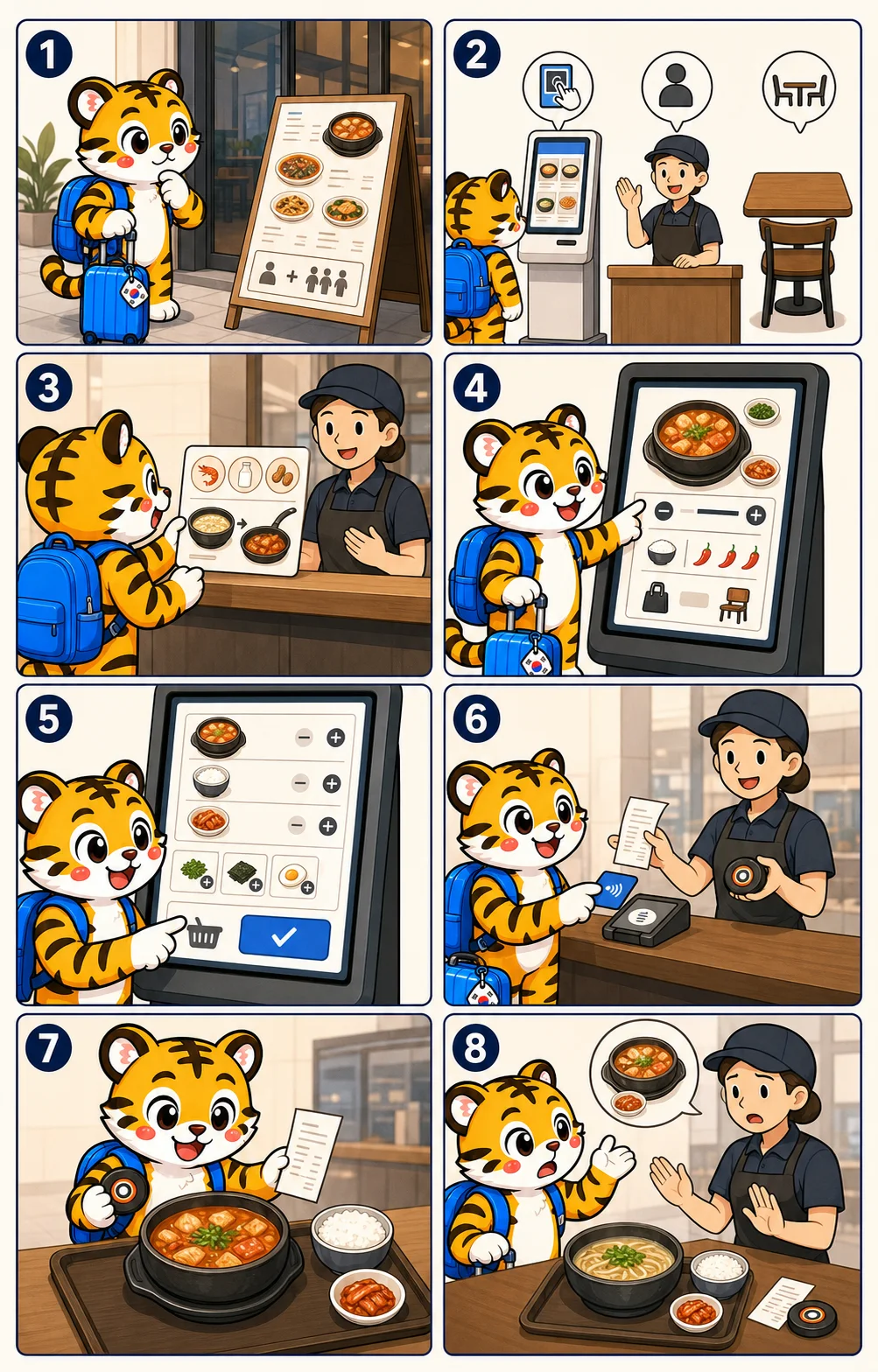
- Panel 3 uses shrimp, milk and peanut icons as examples only. They are not a complete allergen list and the arrows do not promise that a kitchen can remove or separate them.
- The kiosk screens, payment reader, receipt, pager and food are generic editorial shapes. They do not document a real interface, accepted card, price, menu or restaurant.
- Panel 8 shows a traveler asking about a mismatch before eating. The image does not promise a remake, cancellation or refund; the venue must assess what happened.
STEP BY STEP
What you actually do, in order.
- 02
Find where this restaurant takes orders
Look for a touchscreen kiosk, front counter, table tablet or staff taking table orders. If it is unclear, ask '주문은 어디에서 해요?' and follow the current queue or table-number system.
Look for 키오스크 · 주문 · 카운터 · 테이블 주문
Do not build an order in the wrong queue or assume that a table means staff will come automatically. The service channel belongs to the venue.
ILLUSTRATED GUIDE02Find where this restaurant takes orders - 03
State safety needs before the order is accepted
Show a specific Korean allergy or dietary card before payment and ask staff to check broth, sauce, garnish, side dishes and shared equipment. Wait for a clear answer about the exact dish.
Look for 알레르기가 있어요 · 이 재료를 먹을 수 없어요
The ingredient icons in the illustration are examples, not a complete allergen list. A removed topping or vegetarian-looking photo cannot prove the meal is safe.
ILLUSTRATED GUIDE03State safety needs before the order is accepted - 04
Make the item, quantity and options exact
Confirm the written item, number of portions, size, spice level, additions, removals and whether you will eat there or take it away. Use short phrases and point to the matching choice on the screen or menu.
Look for 이거 하나 주세요 · 수량 · 맵기 · 매장 · 포장
'Not spicy' is a preference request, not an allergy check. Some recipes and pre-mixed sauces cannot be adjusted, so let staff say no rather than assuming.
ILLUSTRATED GUIDE04Make the item, quantity and options exact - 05
Review the complete basket before confirming
Read every line on the final kiosk, tablet or written order: item, quantity, option, add-on and total. Remove accidental extras and verify that dine-in or takeaway is correct before pressing the final confirmation.
Look for 주문 확인 · 수량 · 추가 · 총금액
A large image can hide a default add-on or set upgrade. The final basket, not the first menu card, is the order you are about to place.
ILLUSTRATED GUIDE05Review the complete basket before confirming - 06
Pay with one confirmed method and keep the token
Use a payment method the counter or machine confirms, then keep the receipt, order number, pager or table number. It is the shared reference for pickup, a missing item or a card problem.
Look for 결제 · 영수증 · 주문번호 · 호출벨 · 테이블 번호
Kiosk payment support varies, and a foreign card can fail. Do not submit a second payment until staff confirms whether the first attempt was recorded.
ILLUSTRATED GUIDE06Pay with one confirmed method and keep the token - 07
Match the served food to the order before eating
Compare the dish, quantity and important requested changes with the receipt or saved menu. For a safety-critical request, ask staff to reconfirm rather than judging by appearance.
Look for 주문번호 · 메뉴명 · 요청사항
Two dishes can look similar, and the absence of a visible ingredient does not prove the broth, sauce or shared equipment changed.
ILLUSTRATED GUIDE07Match the served food to the order before eating - 08
Stop and ask when the order does not match
Before touching the food, show the receipt and say '주문한 것과 달라요' while pointing to the mismatch. Let staff explain the remedy; remake, cancellation and refund rules depend on what happened and the venue's policy.
Look for 주문한 것과 달라요 · 확인해 주세요
Do not eat a suspected allergen while negotiating. If a severe reaction begins, call 119 and give the location first rather than waiting for the restaurant to resolve the order.
ILLUSTRATED GUIDE08Stop and ask when the order does not match
CHECKED FACTS
Check fares and travel times
Checked on 2026-07-29 using the official sources below. Fares, times and services can change, so check again on the day you travel.- Ordering channel
- Kiosk, counter, table device or staff service can all occurUse the venue's current queue, table and payment instructions.
- Order record
- Review the complete basket and keep the receipt or tokenItem, quantity, options, additions and total should match before food is prepared.
- Safety request
- Disclose before payment and confirm the exact dishDiet labels and pictures do not establish allergen control or cross-contact separation.
- Mismatch
- Ask before touching the foodThe venue determines the remedy; a severe allergic reaction is a 119 emergency.
WHERE THIS PUTS YOU
Places within reach of the far end.
Mangwon Market
망원시장
Street food, market snacks and a picnic stop near Mangwon Hangang Park.Gwangjang Market
광장시장
A covered market known for bindaetteok and mayak gimbap, eaten standing at the stall.