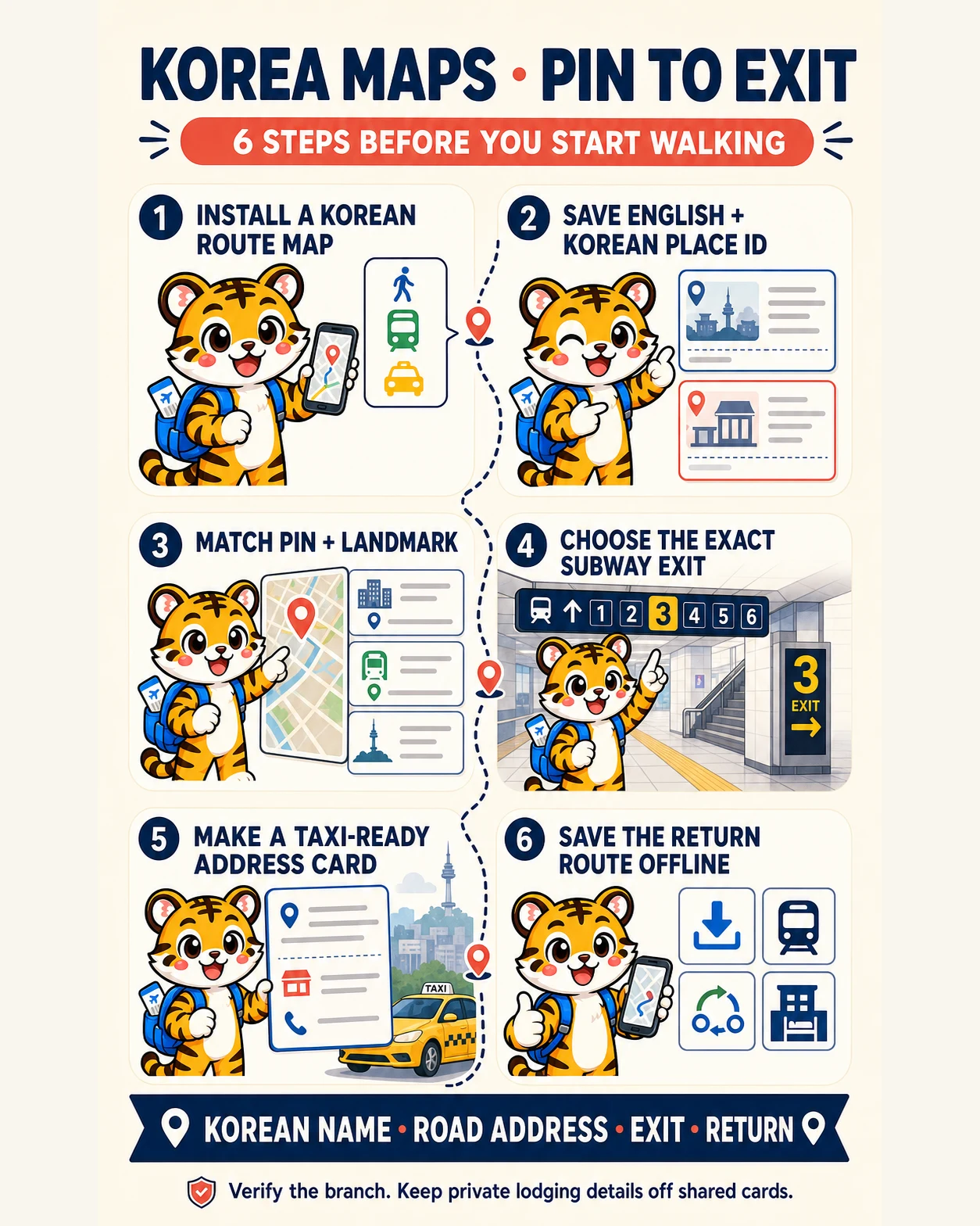
Skip to main content← All guidesA six-step pin-to-exit setup; live routes, business records, supported languages and final services still require a current local-map check.Illustration: Korea Era editorial studio · Korea Era original editorial illustration
TRANSPORT · GUIDE
Using Korean maps, addresses and subway exits
Install Naver Map or Kakao Map, save the Korean place name and road address, and navigate to the correct subway exit rather than relying on an English business name alone.
An English place name or hotel booking→A route that works on the street in Korea
QUICK ANSWER
Get the answer before the details.
◆
Map choice
Naver Map or Kakao Map
●
Search backup
Korean place name
+
Address format
Road address plus phone number
LAST CHECKEDAugust 22, 2026
USE IT ON THE TRIP
Keep this guide for the day you need it.
Add it to an itinerary, or ask travelers when one detail may have changed since the last official check.
1Install a map built for Korean routesSet up Naver Map or Kakao Map before travel and choose an available interface language.
Set up Naver Map or Kakao Map before travel and choose an available interface language. Download or screenshot the routes you cannot afford to lose.
2Save both the English and Korean place identityStore the Korean name, road address and phone number from the official venue or accommodation page.
Store the Korean name, road address and phone number from the official venue or accommodation page. Branch names matter for chains.
Watch out An English nickname or translated hotel name may point to no result or the wrong branch.
Start the trip
3Check the pin against the surrounding landmarkBefore starting, compare the district, nearest station and nearby landmark with your booking.
Before starting, compare the district, nearest station and nearby landmark with your booking. Do not trust a search result only because the name looks similar.
4Choose the correct subway exitRoute to the exit number closest to the destination and follow the numbered signs inside the station before reaching street level.
출구 · Exit
A schematic of labels to look for, not a photograph of actual facility signage.
Route to the exit number closest to the destination and follow the numbered signs inside the station before reaching street level.
Look for 출구 · Exit
Watch out Large stations can have exits on opposite sides of a major road or several blocks apart.
During the trip
5Make a taxi-ready address cardShow the Korean road address, place name and phone number in large text.
Show the Korean road address, place name and phone number in large text. Keep a screenshot so it works without data.
Watch out Do not include room numbers, access codes or other private lodging details on a shareable card.
6Recheck the return route before going offlineSave the last-train or bus route, transfer points and accommodation address before entering a venue, hiking area or late-night district.
Save the last-train or bus route, transfer points and accommodation address before entering a venue, hiking area or late-night district.
COMPARE OPTIONS
Choose without rereading the page.
Naver Map
Cost
Free app and web service
Time
Live navigation
Kakao Map
Cost
Free app and web service
Time
Live navigation
Offline address card
Cost
Free
Time
Available without data
Option
Best for
Cost
Watch out
Naver Map
Multilingual place search, public transit, walking and regional route planning.
Free app and web service · Live navigation
Translations and business records can still be incomplete; verify the Korean identity.
Kakao Map
Korean place search, public transit, walking and street-level checking.
Free app and web service · Live navigation
The supported interface languages and individual listings can differ.
Offline address card
Taxi rides, low battery, weak signal and asking staff for help.
Free · Available without data
Keep private lodging access details off the card.
AVOID THESE MISTAKES
4 mistakes worth remembering.
Searching only an English hotel or restaurant name.
Do this instead Save the Korean name, road address and phone number from an official listing.
Walking out of the nearest-looking station exit.
Do this instead Follow the route's exact exit number while still inside the station.
Trusting a pin without checking the district or branch.
Do this instead Match the district, station, landmark and phone number before starting.
Sending a taxi driver a long English message.
Do this instead Show a large Korean road address and place name, with the phone number as backup.
TRAVELER FAQ
Answers before you leave.
Which map should I use in Korea?
Official visitor transport guidance lists Naver Map and Kakao Map for driving, public transit and walking routes. Install at least one before travel.
Why can I not find my hotel in English?
The translated name may differ from the registered Korean listing. Search the Korean name or road address from the booking or official property page.
What address should I show a taxi driver?
Show the Korean road address and place name in large text, with the phone number available to distinguish branches.
Are subway exit numbers really important?
Yes. Large stations can place exits far apart or across divided roads, so the exit is part of the route.
Will the map work outside Seoul?
Both official visitor resources cover routes and places beyond Seoul. Regional data depth varies, so keep the Korean destination identity and an offline backup.
How to reach Korean cities by long-distance bus: express versus intercity services, official booking sites, terminal matching, ticket collection, luggage and the return trip.
A foreign-traveler workflow for booking KTX and conventional trains, choosing the correct Seoul-area station, handling sold-out departures and deciding whether a KORAIL Pass is worth it.
A practical comparison of Tmoney, EZL, WOWPASS and Seoul's Climate Card, including where the boundaries are, why foreign cards are not a reliable top-up plan, and what to do before the last ride.
Sources & verification4 official sources · August 22, 2026
Check it yourself.
Every changing rule stays attached to the organization responsible for it.
Last checked August 22, 2026. Korea Era edits these guides from official sources and does not decide eligibility, fares or schedules on your behalf.
SEOUL PRACTICAL CHECKLIST · ENGLISH
Seoul subway, addresses and exits: make the last five minutes easier
Finding the right station is only part of getting somewhere in Seoul. The destination still needs to match the place you intended to visit, and your final walk needs to start from a useful exit. Instead of treating a station name, an address and an exit number as interchangeable, keep all three. A short route card makes it easier to check the journey at each decision point without scrolling through a long itinerary.
1. Separate the destination from the route
Start with the venue's Korean name, road address and branch name, taken from its own website or confirmed booking information. These identify the place. The station and exit are the route you will use to reach it. If the map result has a familiar name but a different district or branch, pause before selecting it. Ask the venue to confirm the public entrance if the address and pin do not agree.
2. Write a three-line route card
Line one is the destination identity: Korean name, branch and road address. Line two is the journey: departure station, line or operator, direction and transfer. Line three is the arrival: station, exit or elevator location to check, and the final walk to the entrance. Leave room for the return journey below. Keep sensitive accommodation access details elsewhere. This is an editorial planning aid, not a substitute for a live route or the signs in the station.
3. Use the map as a check, not a verdict
Seoul's official transport page identifies Naver Map and Kakao Map among route and live bus-information resources. Korea Tourism Organization also describes Naver Maps' route planning and saved-place features. Try a local route resource before travel, then compare the result with the venue's address. App languages, listings and entrances can change; a saved place is not proof that a business is open or that a walking entrance is usable. Seoul Metropolitan Government transport resources · Korea Tourism Organization map resources
4. Recheck direction at the platform
Before boarding, match the route's line and direction to the station signs, and check the next station displayed for that direction. Treat a transfer as a fresh decision rather than blindly following a crowd. If your train or platform does not match the route card, stop and ask staff instead of trying to recover by repeatedly passing through gates. this section does not guarantee a transfer discount or tell you that every train on a line serves every destination.
5. Choose the exit while you are still inside
Check the station's local-area map and the final walking route before heading to street level. If you need step-free access, verify an elevator route rather than assuming the closest exit has one. A venue's suggested exit may not suit your luggage or access needs. If you emerge somewhere unexpected, look for a safe public place to reorient; do not cross a road simply because the destination pin is on the other side.
6. Plan the way back as its own journey
For an evening visit, check the intended departure time, direction and every onward connection. Do not turn an approximate “last train” claim into a return guarantee. If you cannot confirm service, shorten the outing or arrange a verified alternative. Save the Korean accommodation address for asking staff or a driver for help, without including room numbers or entry codes.
Finally, note what actually worked: the entrance you used and any corrected branch or exit detail. Those observations can improve a future itinerary, but keep them separate from facts that require a new check. The useful habit is not memorizing the whole subway network. It is confirming the destination, the boarding decision and the last few minutes of the walk.
An eight-step Seoul route workflow covering Korean place names, live directions, transit products, platform direction, taps, exits and elevators, bus stops, and late-night recovery.
How to choose between station lockers, Seoul T-Luggage storage and same-day delivery, with size checks, operating-hour limits, prohibited items and a safe handoff record.
A decision and pickup checklist for driving in Korea, including licence documents, insurance, tolls, navigation, parking, fuel, road rules and collision records.